Downloads
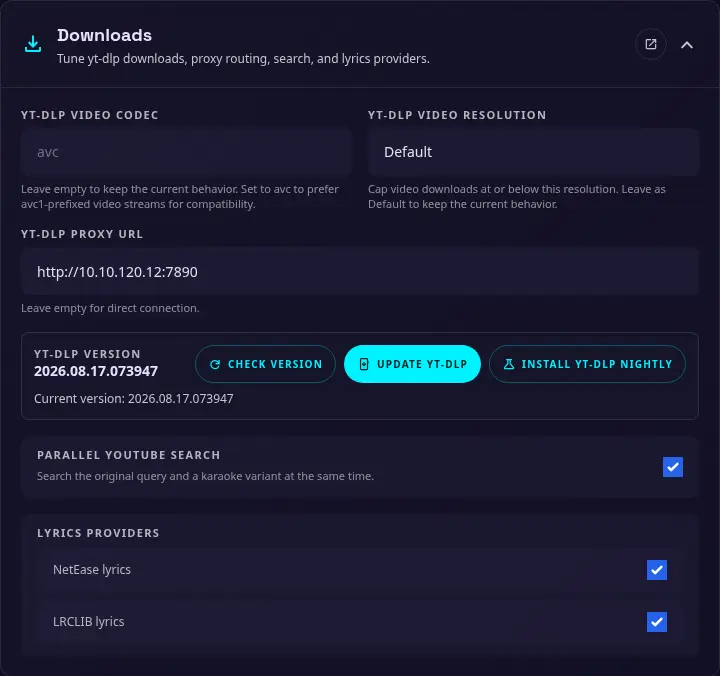
Use this section to control yt-dlp download preferences, proxy routing, concurrent search, and lyrics providers. These settings can also be configured with environment variables when a deployment needs fixed values.
yt-dlp video codec
An optional video codec preference for yt-dlp. Leave this empty to use yt-dlp's default selection.
Apple devices browser have limited codecs support, set it to avc in case of video playback issues.
yt-dlp video resolution
The maximum preferred video resolution. Choose Default to keep the current behavior, or select 360p, 480p, 720p, 1080p, or 2160p to cap video downloads at that resolution or below.
yt-dlp proxy URL
An optional proxy URL for yt-dlp and related outbound requests. HTTP, HTTPS, SOCKS4, and SOCKS5 proxy URLs are supported. Leave this empty to connect directly.
yt-dlp version
Use Check version to display the installed yt-dlp version. Update yt-dlp installs the stable release, while Install yt-dlp Nightly installs the nightly release. Update yt-dlp when a provider changes or when the current version no longer works with a video source.
Parallel YouTube Search
Search the original query and a karaoke variant at the same time. This can return more useful results, but it creates additional outbound requests.
Lyrics providers
Enable or disable the built-in lyrics providers:
- NetEase lyrics
- LRCLIB lyrics
Disable a provider when it is unavailable or when you do not want it used during lyrics searches.