VirtualBox Kali Linux Wi-Fi Gateway for a Cruise Ship
Published: July 01, 2026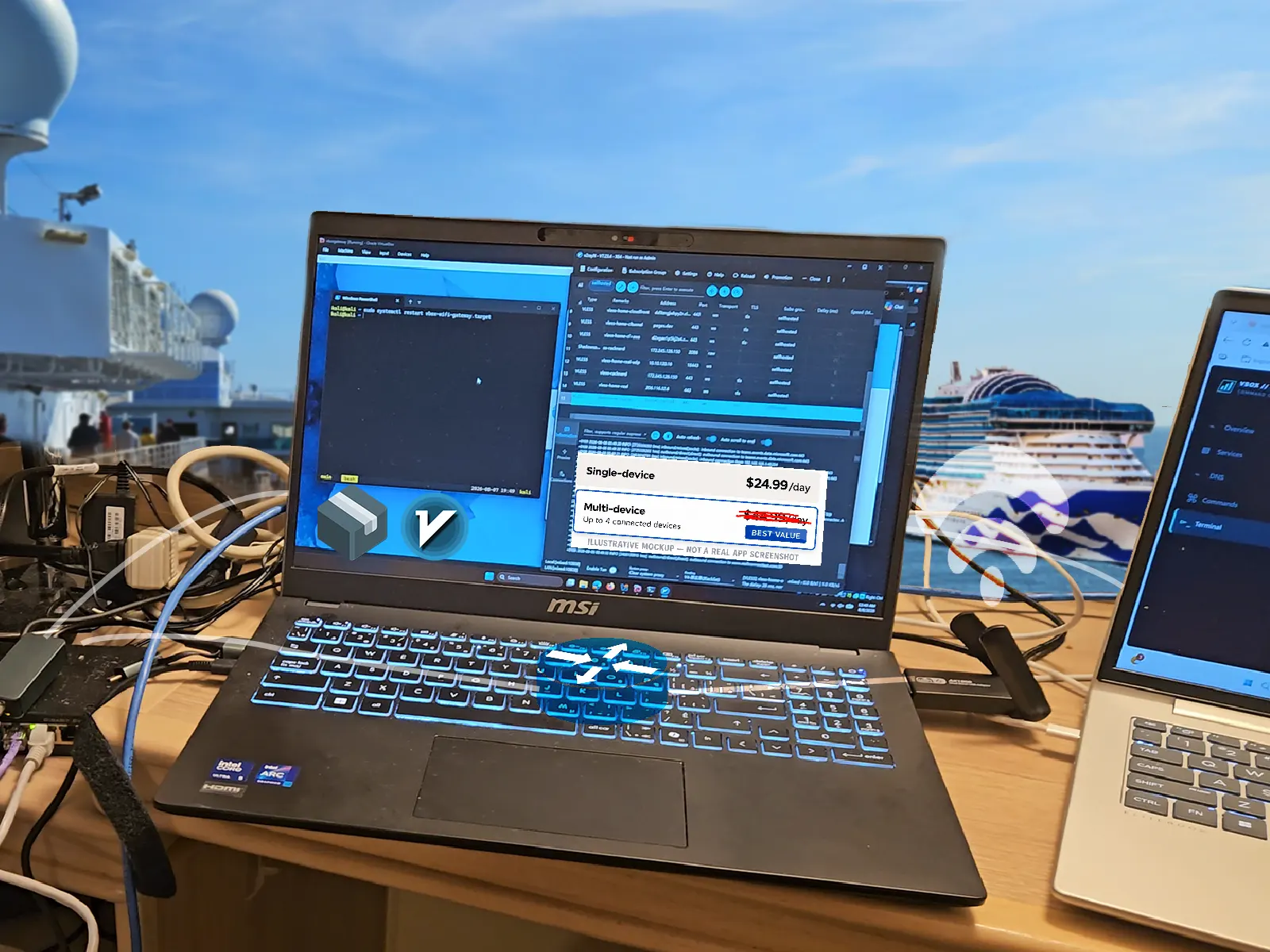
Introduction
Cruise ships are expensive; Wi-Fi is no exception. On the sea, cruise companies can charge whatever they want. Some charge higher prices for multiple devices; some even segregate their plans by speed tiers and restrict access to certain websites. And our family was going on a cruise in August 2026.
In September 2025, my college friend told me about his cruise, and his mom had to contact guest services to restore their Wi-Fi plan after attempting to share her Wi-Fi with multiple people. I didn't ask for details or verify the technical accuracy from him, but it did place me on high alert.
In addition, r/Tailscale discussions 1, 2 extensively discussed cruise ships blocking website access. Losing access to my homelab is not acceptable for me.
Website restrictions weren't new to me. I already self-hosted VLESS proxies over WebSockets and TLS, sometimes through a CDN, the exact setup Chinese and Russian users use in their regime, and the traffic mimics normal HTTPS traffic. But sharing one Wi-Fi subscription across multiple devices presented a different challenge.
Problem Statement
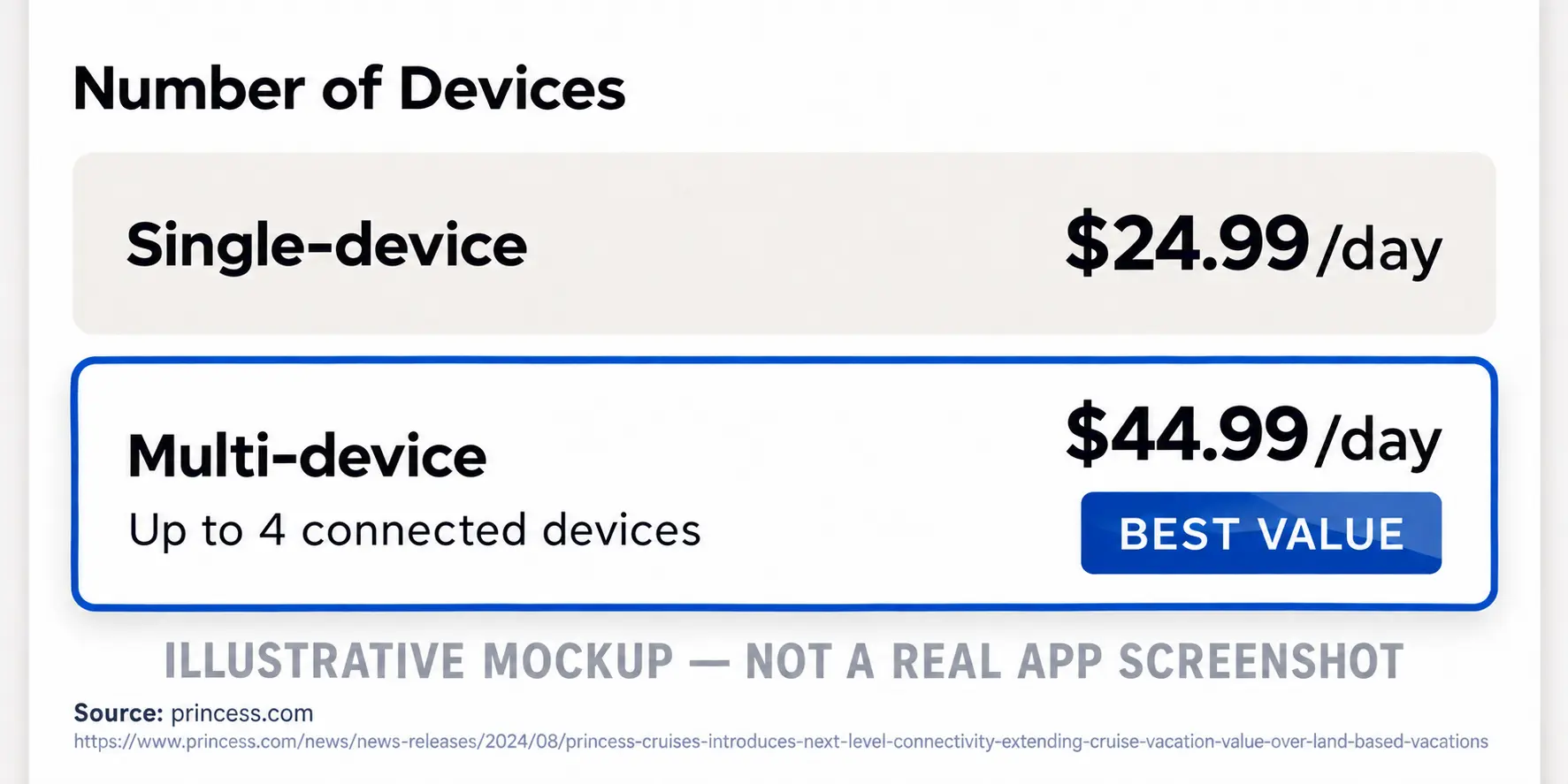
Princess Cruises offers Wi-Fi for $25/day for a single device; new devices will disconnect the previous one. The problem is, I have multiple devices, so do my parents. How on earth was I going to connect all of them at once?
On top of that, I was on a co-op term with no vacation time. I needed reliable connectivity for Teams and DevOps work. I couldn't sacrifice my work laptop, and my family needed internet too.
Wi-Fi Hotspots and NAT
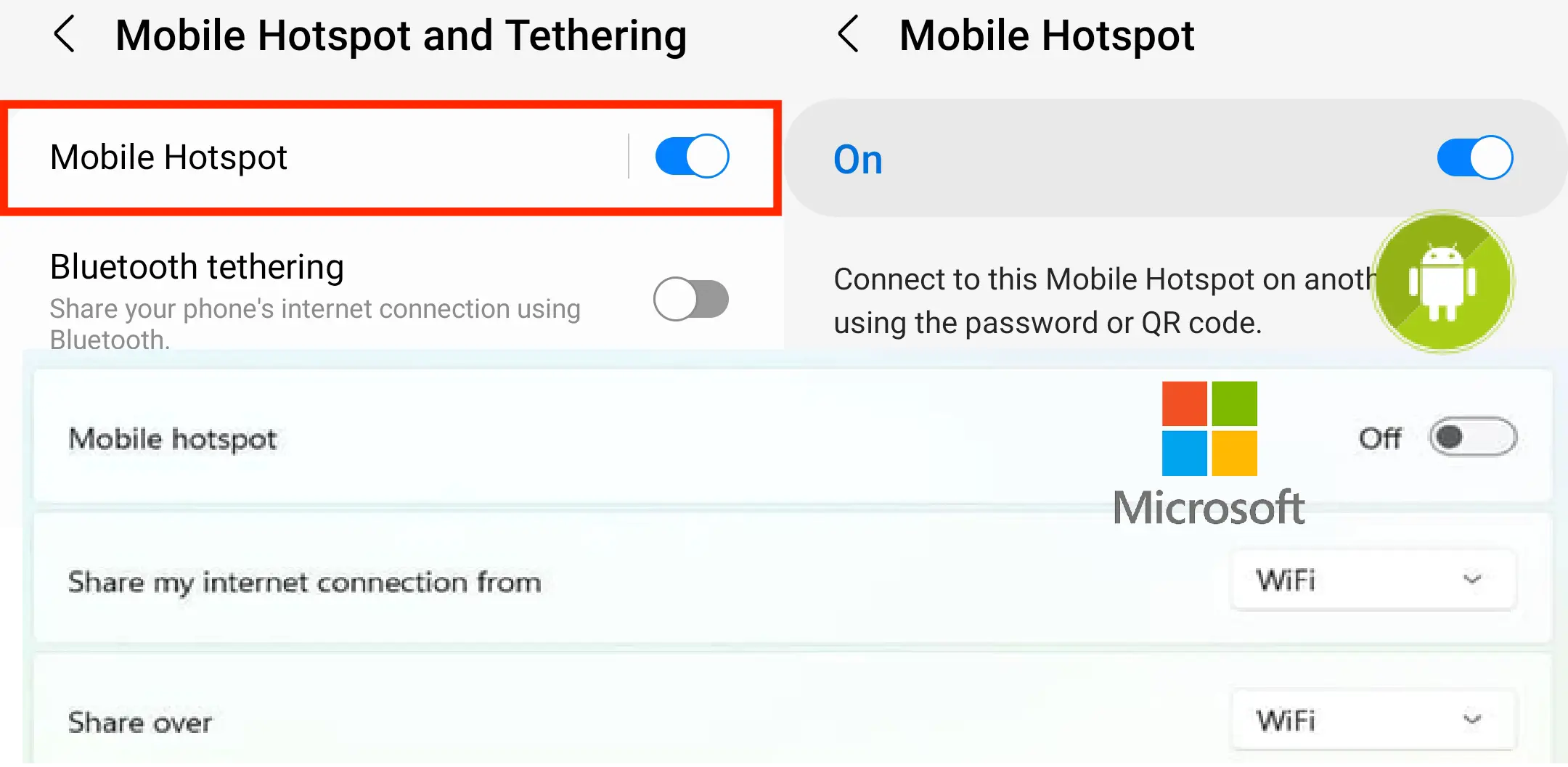
The solution seemed obvious: create a Wi-Fi hotspot. Android and Windows (sorry iOS) already have a mobile hotspot feature. If it's that simple, (it actually is), why is the post so long?
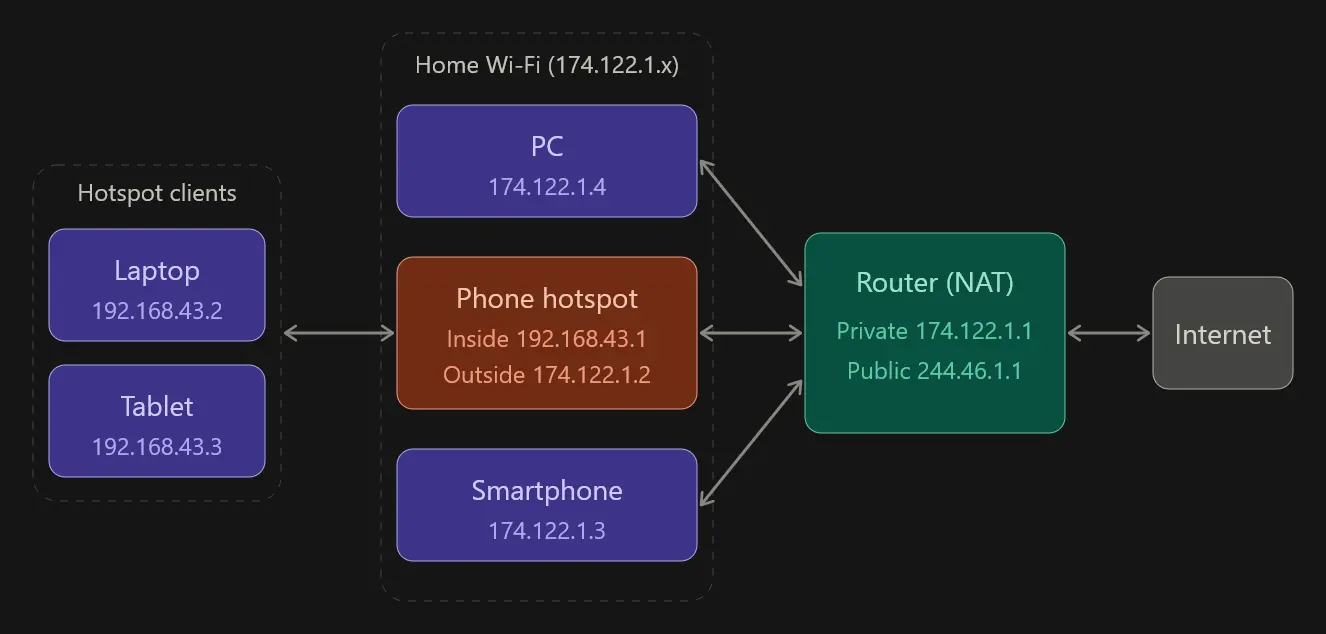
Most home networks already use Network Address Translation (NAT), allowing multiple devices with private IPv4 addresses to share a public one. A hotspot works similarly, forwarding connections from downstream devices through its own upstream connection. From the upstream network's perspective, the connections share the hotspot device's IP address.
Disclaimer: Based on my own research and understanding
Below is my best understanding of technical measures against hotspotting or website blocking. Princess Cruises does not implement these measures, and other cruise lines may or may not implement these.
TTL Detection
Each time a packet is routed, Time To Live (TTL) is decremented by 1; NAT is no exception. For Windows, the TTL is 128 whereas mobile devices have 64. Normally a single Samsung phone browsing the web will create TTL of strictly 64, whereas if there's an iPhone and a Windows laptop using the Samsung's hotspot, the TTL observed by the cruise will be 64, 63 and 127 respectively; 3 different values, which suggests multiple devices.
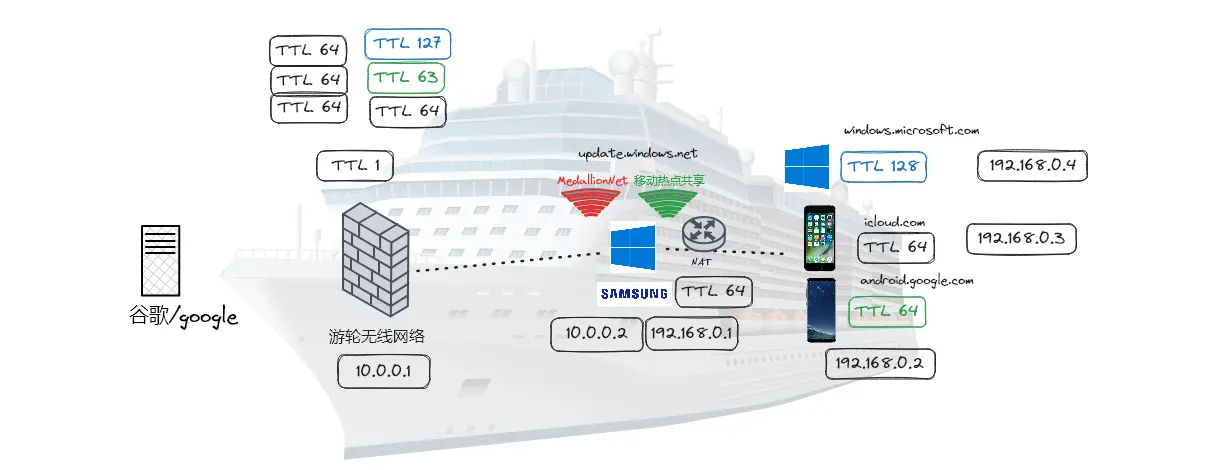
The cruise may also set outgoing TTL to 1; it’s fine for normal devices, but for an IP router like a mobile hotspot, it will be decremented to 0 and dropped. On a travel router, it's possible to change the TTL against these measures, but normal mobile hotspot doesn't have this option.
OS Fingerprinting
TTL isn't the only thing that survives NAT. Each operating system handles TCP differently, and a network device can approximate the device type by observing packet timing, size and other characteristics.

NAT rewrites IP and port without rebuilding the underlying TCP connection. Devices behind a hotspot therefore keep their own TCP fingerprints, and a network can use those differences to infer hotspot sharing.
Website Fingerprinting
Most forums often overlook this, but the logic is plausible with a hypothetical adversary. Suppose a Samsung phone is connected to your Wi-Fi, and it's suddenly pulling Windows updates or receiving Apple push notifications. Wouldn't that be suspicious?
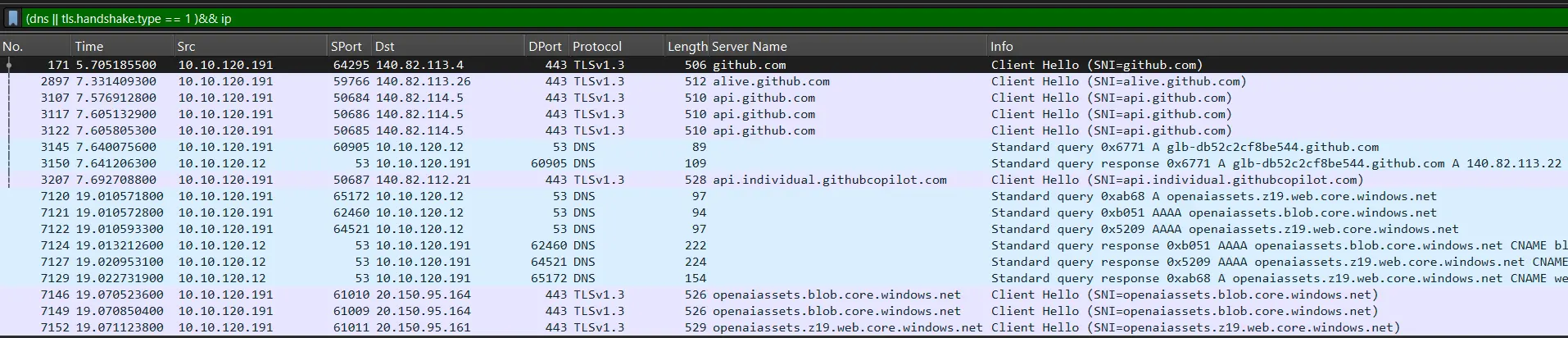
Understanding DNS and TLS is fundamental to building any network project. When you visit a website, your device first asks DNS for its IP address. It then establishes a TLS connection to encrypt your data, but the domain name, or SNI (Server Name Indication), is sent in plaintext. Both are easily observable. Below is a Wireshark capture filtered on dns and tls.handshake.type == 1 (Client Hello packets).
Restricting Access
Beyond observing traffic, an adversary can also restrict it.
A DNS resolver could return a poisoned address or NXDOMAIN for a blocked website. Encrypted DNS exists, but DNS over TLS (DoT) always uses port 853, and most DNS over HTTPS (DoH) servers are public knowledge and sit on blocklists. TLS/SNI is a different story.
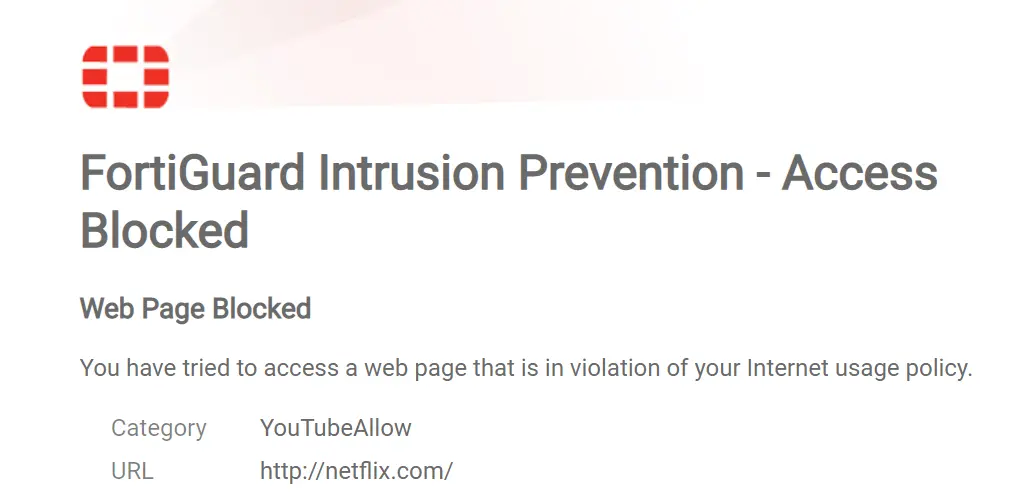
Most of the internet is encrypted, and the days of hackers sniffing passwords are gone, but TLS doesn't make you invincible. The SNI is observable in my own PCAP. An adversary can reset the connection, serve a bogus certificate and redirect you to a block page, or man-in-the-middle (MITM) attack.

Deep Packet Inspection
VPN is the most commonly advertised solution against censorship. Your device connects to a VPN server, the traffic is encrypted before it reaches the website. But VPN servers are easy to identify and networks have an incentive to block them, some cruises restrict websites by plan, and VPNs can bypass that.
A traditional VPN may hide DNS and SNI, but the adversary still sees a long-lived connection to a single server. Furthermore, VPN protocols such as OpenVPN, WireGuard or even earlier obfuscation have patterns that can be identified and blocked. Even with obfuscation, commercial VPNs like ProtonVPN, NordVPN servers are constantly monitored and blocked.
Proxy Solves Both
With the knowledge above, I needed an excessively overengineered solution before August. I spent an eternity explaining why it doesn't work, but how do you make it work?
Proxy servers kill both birds with one stone.
Specifically, V2RayN, a Windows client for xray-core, commonly used in China to bypass the GFW. The ecosystem is complex and the specific protocols or transports aren’t discussed. I already self-hosted VLESS + WS + TLS and others on a wide range of VPS and CDN networks and it's the foundation of this project.
My original inspiration came from this post where the author used Every Proxy with Android mobile hotspot where standard hotspotting failed. Both proxies and NAT seem to make the request on behalf of another. NAT works at the network layer, routing and rewriting IP packets of the same connection, while a proxy works at the application layer, terminating it to make a new one.
A new connection is the key, made by the proxy server as a process, like Chrome visiting a website. The TCP fingerprint remains the OS of the proxy server. As for TTL, the connection already ended when it reached the proxy server; no NAT or routing is performed.
Domain Based Routing
VPN works on the network layers, split tunneling is limited to IP addresses; proxies work by domain names, keyword matching, regex and domain wildcard (*.domain.com). v2fly/domain-list-community provides lists of domains for popular websites. Simply typing geosite:category-games matches thousands of domains that I don't need to discover manually.
科学上网 (Scientific Internet Access)
Suppose a request for google.com and android.game (fictional Android only blocked site) was made to V2RayN and routing rules are configured. The proxy reads the domain name and chooses the outbound.
- for
google.com, the rule is direct, so the proxy visits google directly through cruise internet - for
android.game, the proxy establishes an obfuscated VLESS connection to my home server masked as a church site, then tunnels theandroid.gametraffic over encrypted WebSocket.
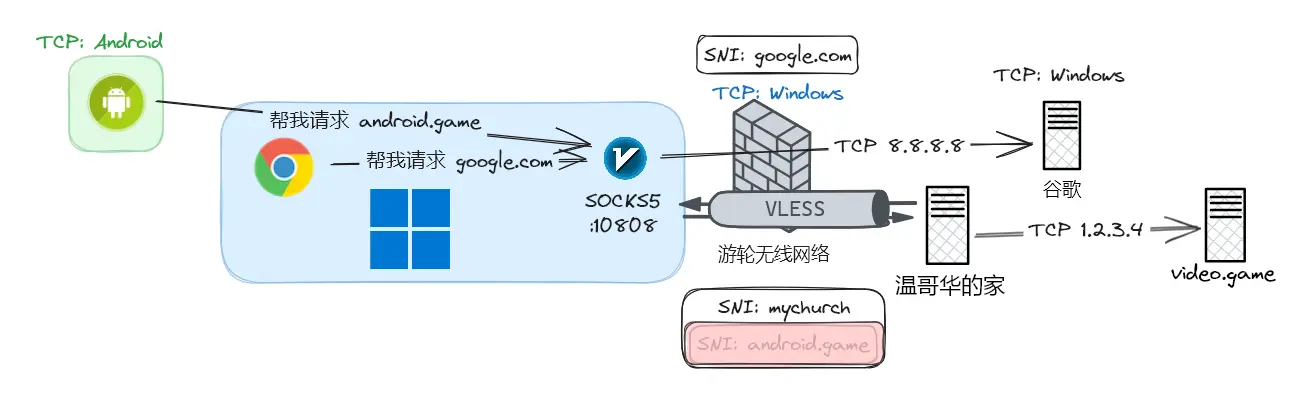
From the cruise’s perspective, the user is praising the Lord, never any Android gaming. The same mechanism can handle all unrelated non-Windows traffic that can identify I'm using multiple devices. This gets it closer to blending in like a normal Windows computer.
Choosing what sites to proxy is a careful balancing game. This picture is probably the most important design of this project.
- routing too much/everything through the proxy risks detection because of high traffic volume to it
- routing too little/nothing risks detection when device-specific traffic isn't masked

I chose a direct-by-default strategy, selectively proxying domains associated with Android and iOS, restricted websites, and resources in my homelab. This reduced traffic through the proxy, reducing the risk of detection.
Proposal
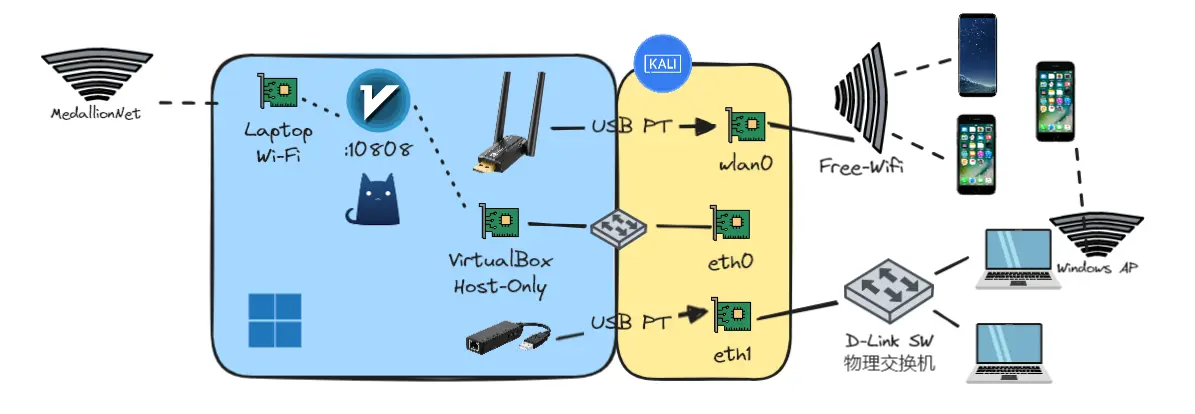
I figured I could do better than Every Proxy on a phone. I have a laptop and a MediaTek MT7921 adapter and full control over my hardware and software. Why not transparent proxying, where I can access any blocked website or my homelab 10,000km away simply by connecting to my personal Wi-Fi.
Physical Layer
A travel router is a solution. Many advertise to bypass hotspotting restrictions, but it costs more, I hadn't verified it works and I felt I could build it better. Cruise line banning travel routers was concerning. Failing at the physical layer, the security checkpoint, would make the entire project useless.
Laptops, on the other hand, are ordinary. My USB adapter is small, and a reasonable excuse is that the laptop's built-in Wi-Fi is broken. The fact that I later brought a 2.5G USB NIC and a D-Link five-port switch aboard probably wouldn't help my case.
Windows
Connecting to and authorizing on the cruise Wi-Fi is its own challenge. A travel router can spoof a device, but cruise lines are actively blocking them, reauthorizing to the portal is often needed, and a Linux router pretending to be a phone can be fragile.
With Windows, the process is straightforward: connect to the Wi-Fi, open the captive portal in Edge, and authenticate normally. There is zero spoofing or tweaking needed for working internet. The cruise sees a Windows laptop performing ordinary office tasks, because that's exactly what it is.
Linux would have been better and would have avoided the virtualization issues later, but I wasn't confident about captive portals or detection. I was overly cautious at every layer of the stack.
VirtualBox Host-Only
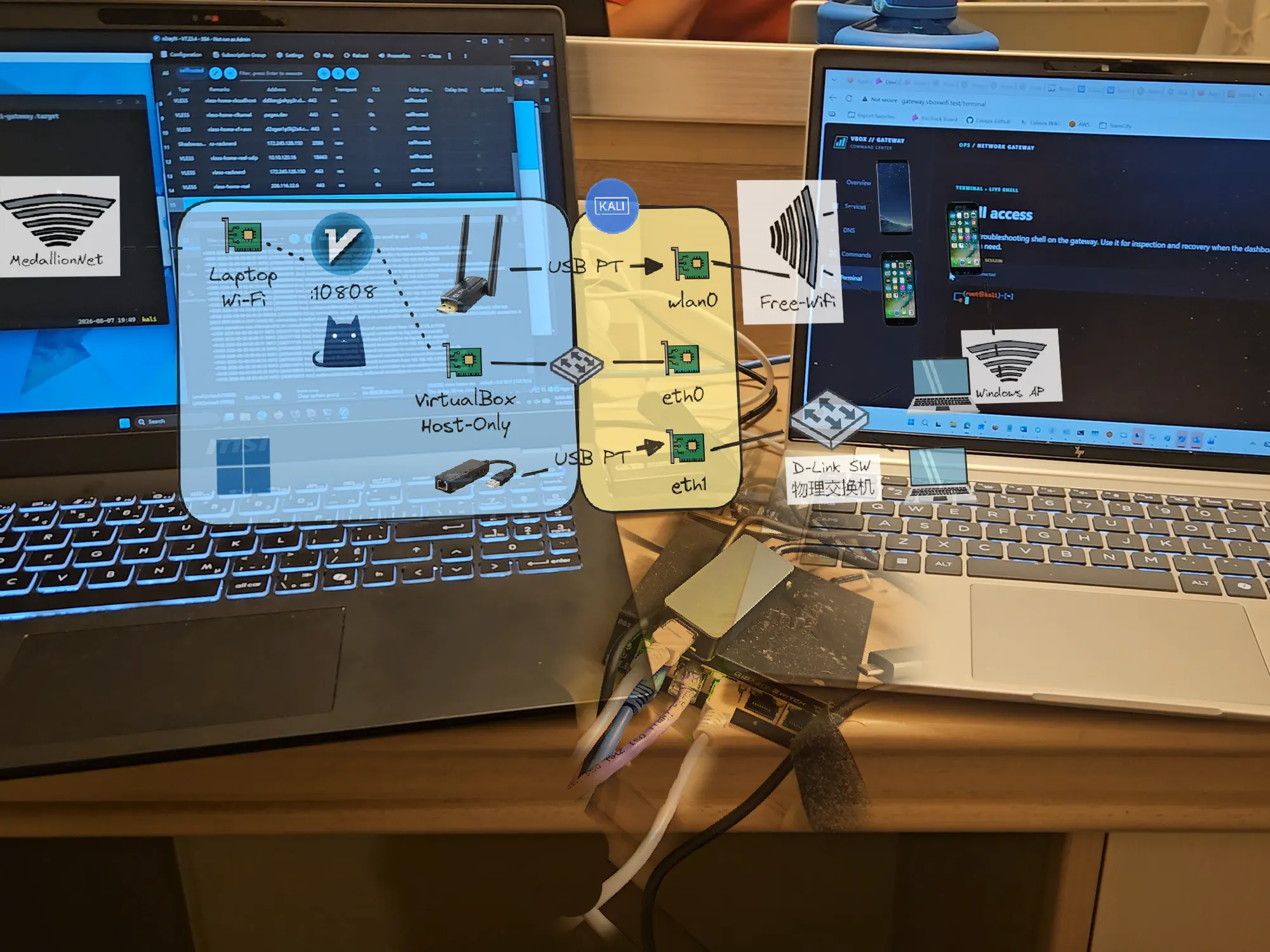
Windows networking is limited, and I never intended to manage my Wi-Fi there. Linux networking is powerful, including transparent proxying. That meant I needed a VM. I chose Kali Linux because the Taobao seller confirmed it would work, but any Linux with IP forwarding would do.
VirtualBox provides different networking modes, which is useful for testing malware without lateral movement. Host-only networking is interesting: it isolates the VM while still allowing access to the host.
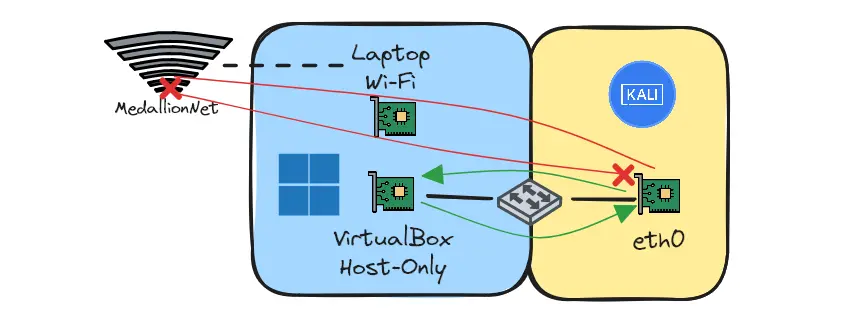
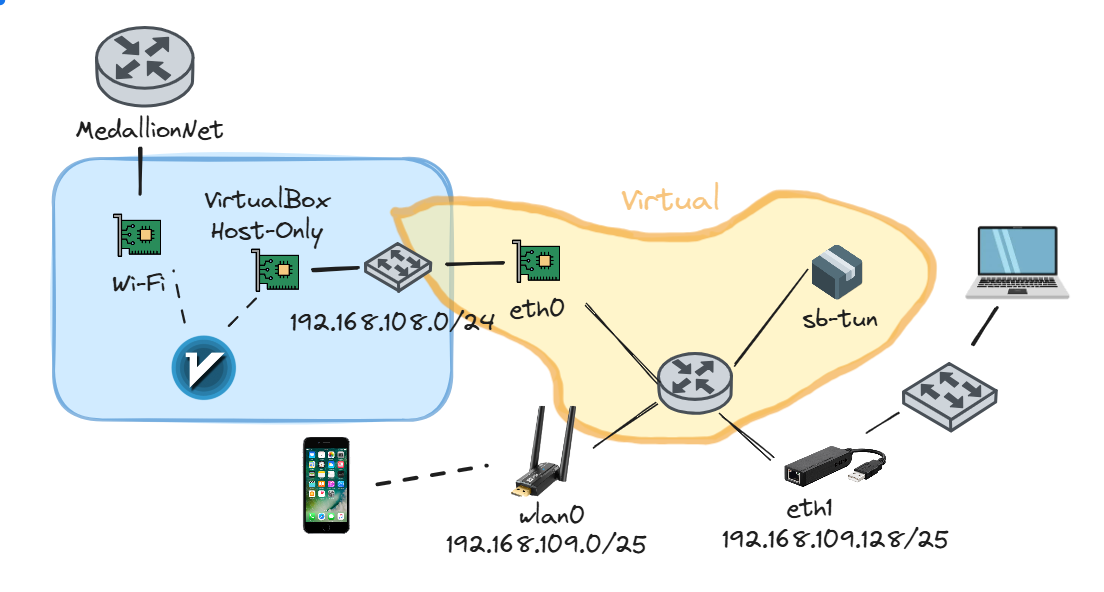
The virtual adapter on the host acts as a switch, assigning Windows itself an IP address on the same subnet as the VMs. The VM and everything downstream is invisible to the cruise, but it can still reach the proxy via the host-only address if V2Ray listens on 0.0.0.0.
Windows provides a normal-looking device and internet access. The proxy server provides the tunnel. Host-only networking isolates just enough to stay hidden. The proxy makes two connections, fully separating two distinct networks.
Hardware Separation
Having a second Wi-Fi adapter in Windows is useless, so Kali Linux became my gateway. I passed the MT7921 USB adapter directly into the Kali VM. I’d previously experimented with PCIe GPU passthrough, so the idea is familiar. To create a Wi-Fi hotspot in Linux, I used hostapd which requires access to the hardware, not a virtual interface.
The Wi-Fi network is fully separated from Windows and the cruise network. As far as the cruise is concerned, it doesn't exist.
Kali VM Setup
Note: This is not a tutorial; only small snippets are provided for reference.
The finalized logical network was more complex than I imagined: it had USB passthrough of both wired and wireless hardware, and the Kali VM became a fully-fledged router.
Initially I used the default NAT adapter for internet access and installing packages.
sudo apt install -y hostapd dnsmasq iw rfkill nftables tcpdump iperf3 iproute2 conntrack jq netcat-openbsd
After preparing the VM, I switched to host-only networking and assigned the following:
- VirtualBox Host-Only:
192.168.108.0/24- Windows Host:
192.168.108.1/24 - Kali eth0:
192.168.108.3/24
- Windows Host:
- Kali MT7921 Wi-Fi wlan0:
192.168.109.0/25 - Kali USB NIC eth1:
192.168.109.128/25
I also wanted to access services on Windows, such as RustDesk, network shares and V2RayN proxy. Even when ip_forward is enabled in Kali and Windows firewall permits it, Windows doesn't know the return route for the 192.168.109.0/24 network, so I added a static route.
route -p add 192.168.109.0 mask 255.255.255.0 192.168.108.3 metric 5 if XX # XX is the interface index of VirtualBox Host-Only adapter
Hostapd Wi-Fi
The MT7921 USB passthrough was simple yet frustrating. The adapter appeared as wlan0, and the MediaTek driver loaded successfully. I configured hostapd using /etc/hostapd/hostapd.conf, selecting the 5 GHz band with hw_mode=a and a 40 MHz channel width.
sudo iw reg set CA
sudo nmcli device set wlan0 managed no
sudo rfkill unblock wifi
sudo ip link set wlan0 down; sudo ip addr flush dev wlan0
sudo ip addr add 192.168.109.1/25 dev wlan0
sudo ip link set wlan0 up
Throughput and reliability were another problem. 40MHz Wi-Fi should theoretically achieve 400Mbps, but I'm only getting 50-80Mbps in iperf3, without any routing or proxying. I've tried different USB ports, virtualized adapter type, increasing vCPU, watching CPU interrupts, IRQBalance, but none fixed it. In addition, something with VirtualBox USB controller, sometimes I cannot passthrough the adapter at all, unless I re-plug it or even reboot the laptop.
During Wi-Fi speed tests, journald consumed high CPU and revealed a ton of messages from xhci_hcd:
xhci_hcd ... Event dma ... for ep 8 status 13 not part of TD
These messages appeared to be associated with VirtualBox's virtual USB controller under heavy transfers. The most I could do was stop journald from consuming kernel messages; that reduced journald CPU usage during Wi-Fi usage, but throughput remained unresolved.
[Journal] # /etc/systemd/journald.conf
ReadKMsg=no
To beat the dead horse, I passed through a USB NIC, and connected to another laptop using Ethernet, then using Windows mobile hotspot on that laptop, the throughput reached 200Mbps, that laptop had an MT7921... After all these tunings, setups in Linux, the default Windows hotspot beat my VBox-Gateway by simply existing. At least I can use my laptop as an AP if I wanted faster speed or USB passthrough fails.
Dnsmasq/Nftables
With physical networks configured, I needed DHCP and firewall rules. dnsmasq handled assigning IP addresses, probably the easiest part, I configured the interface, IP range, DNS and gateway. The bind-dynamic allows dnsmasq to handle interfaces automatically as it became available, except for the host-only adapter.
bind-dynamic
except-interface=eth0
dhcp-range=interface:wlan0,192.168.109.20,192.168.109.126,255.255.255.128,12h # Wi-Fi clients
dhcp-range=interface:eth1,192.168.109.140,192.168.109.254,255.255.255.128,12h # USB NIC clients
Nftables handles the traffic flow between networks. It may be ideal to allow all traffic, but there's a reason to protect the gateway, not from unauthorized access, but accidental leakage to the cruise network. If they see unhandled packets originating from 192.168.109.0/24, that is convincing evidence of hotspotting, game over. On Windows, ensuring TcpIpRouter is disabled in Windows registry is good, but it's better to follow the principle of least privilege.
The exact /etc/nftables.conf is long, but I configured the following rules:
- default drop all traffic on FORWARD and INPUT chains
- accept DNS, ping, DHCP and return (established,related) traffic to Kali itself
- accept specific ports from Wi-Fi client to Windows host on the FORWARD chain
- V2RayN proxy 10808; RustDesk 21118; SMB 445
At this point, there is no internet access yet, but Wi-Fi clients can access resources in Kali and Windows, including the proxy server.
Transparent Proxy
Transparent proxy and TProxy nomenclature
For this post, I've abbreviated transparent proxy as TProxy, which shouldn't be confused with TProxy, the Linux kernel feature for intercepting network traffic. Transparent proxying is a general term for client-less proxying, the project uses TUN mode, not TProxy to achieve it.
When the client explicitly configures a proxy server or uses a TUN mode client like v2rayNG or Nekobox, there is internet access. We are getting closer to the goal, but I want to make it transparent, where the client doesn't need to install or configure anything; my family members also need to use it.
Sniffing
With an explicit proxy, only applications that support proxies send the domain name to it directly. Without a configured proxy, the system resolves DNS and opens a TCP connection to an IP address. Proxies do support IP addresses, but the advantage of domain-based routing is lost.
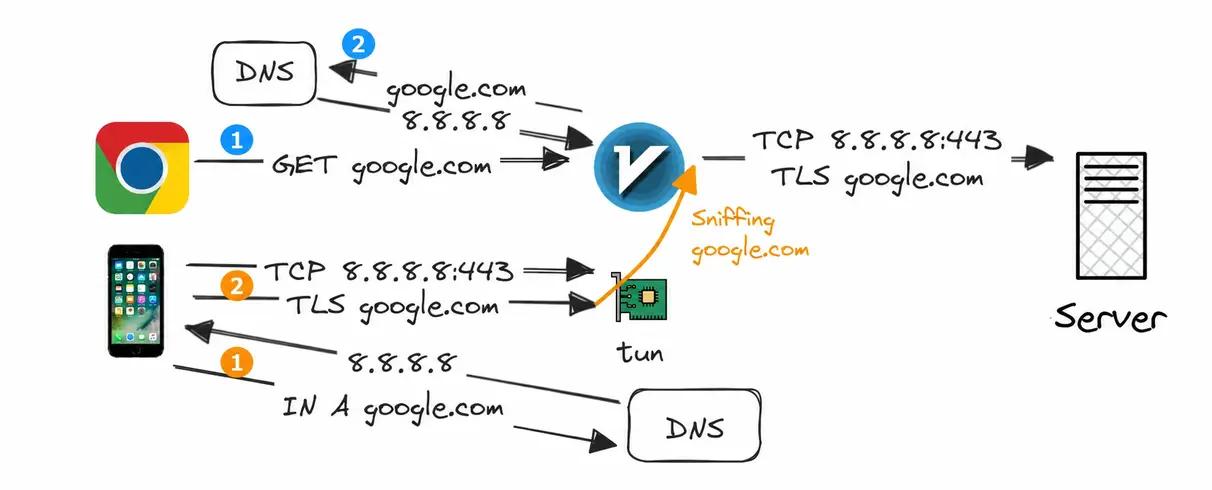
Sniffing extracts the domain name from HTTP and TLS connections, even if the destination is an IP address. It also helps against DNS poisoning, because the proxy resolves the domain on its own network. This feature is the foundation of transparent proxying.
curl -x socks5h://localhost:10808 142.251.33.206
# accepted tcp:142.251.33.206:80 [socks -> direct]
curl -x socks5h://localhost:10808 1.1.1.1 -H "Host: google.com"
# tcp:1.1.1.1:80; sniffed domain: google.com
# accepted tcp:1.1.1.1:80 [socks -> proxy]
For this test I routed Google via the proxy and Cloudflare directly. Without sniffing, the proxy can't recover the domain name, so the connection isn't proxied. With sniffing enabled, even though the client connects to 1.1.1.1, the proxy recovers the destination (google.com) and routes accordingly, and I got the Google homepage.
Rejected ChatGPT Proposal
I initially asked ChatGPT to generate a sing-box configuration. It was full of flaws and I had to reject it.
- dnsmasq forwards DNS requests to sing-box.
- sing-box resolves domains through DNS over HTTPS (DoH).
- DNS requests are routed through the Windows SOCKS proxy.
- sing-box manages its own domain-based routing rules.
ChatGPT seemed to have forgotten my architecture, it suggested type: direct outbound, not knowing all outbound traffic from Kali must pass through Windows V2RayN and traffic leak to cruise network was exactly what I wanted to avoid. The proposal also duplicated the domain-routing logic. I already had routing rules configured in v2rayN, sing-box domain rules seemed redundant.
Although for sing-box managed rules, I proposed a dual proxy setup and custom DNS on Windows which would work, and in some ways better. Where one server specifically handles direct traffic while the other handles proxied traffic, and sing-box in Kali handles routing. Ultimately, I forwent this too, since I'm familiar with routing rules in V2RayN GUI and didn't have to manage 2 servers and a custom DNS server which I hadn’t written yet.
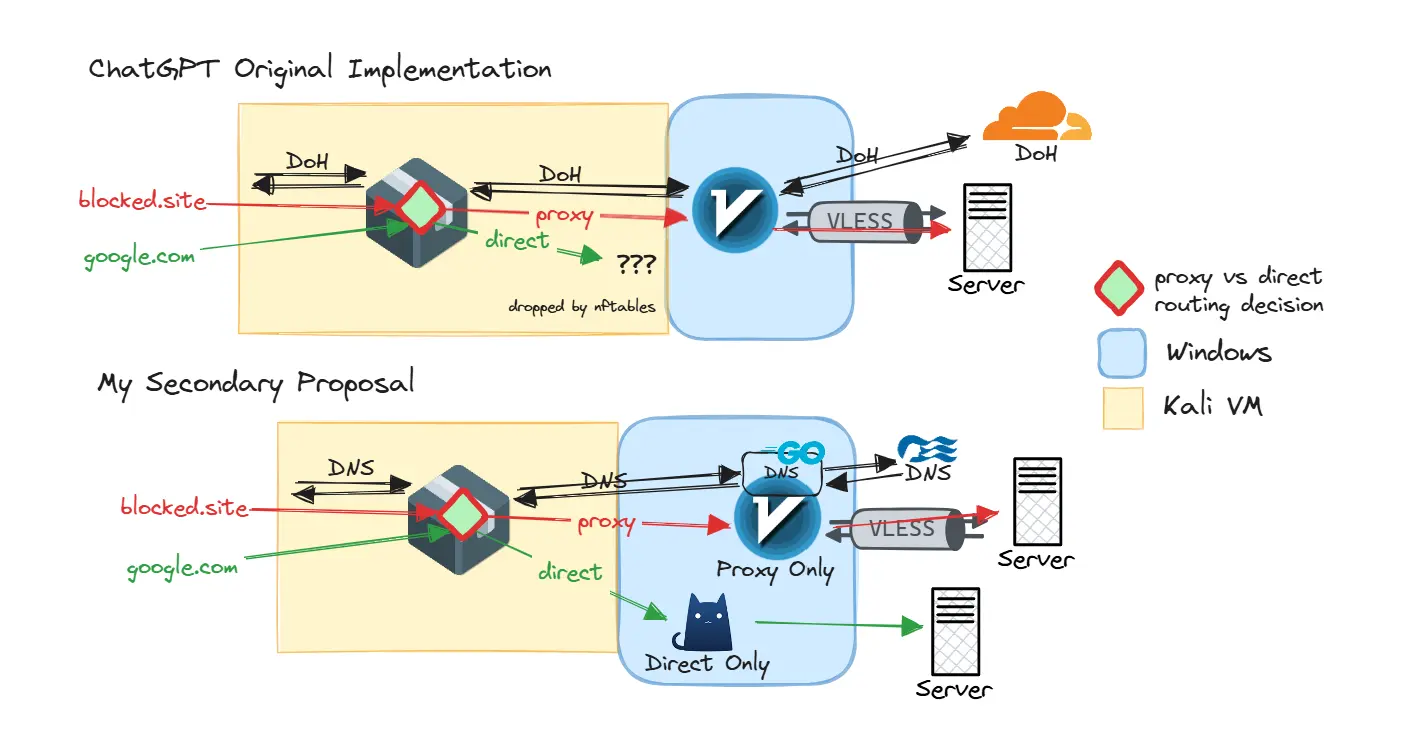
The biggest problem is DoH. Even in normal networks, the overhead of TCP and TLS makes it slower than UDP DNS, on top of proxy detour to V2RayN. Unless I’m self-hosting a custom hidden DoH server which will be slow, I assume all DoH servers are blocked. Every time a device asks for DNS (which is often), there lies the overhead of SOCKS5 detour, TCP and TLS, the cost of getting a real IP address, at least from Kali is high.
FakeIP
What if we skip real IP entirely? FakeIP or FakeDNS is the way. Instead of standard DNS resolution, sing-box can instantly return a fake IP address to the client and keep an internal mapping of the domain to the fake IP. When the client connects to the fake IP, the connection reaches the sing-box TUN interface, which looks up the domain and routes accordingly.
DNS server entry:
{"type": "fakeip", "tag": "fakeip", "inet4_range": "198.18.0.0/15"}
Cache-file configuration fragment:
{"cache_file": {"enabled": true, "path": "cache.db", "store_fakeip": true}}
If sing-box is restarted, downstream devices encounter weird issues because the FakeIP mapping is lost. I added the cache file to persist the mapping. I also configured dnsmasq server=127.0.0.1#5353 to forward all DNS requests to sing-box, plus a DNAT rule to redirect all UDP/53 traffic to dnsmasq.
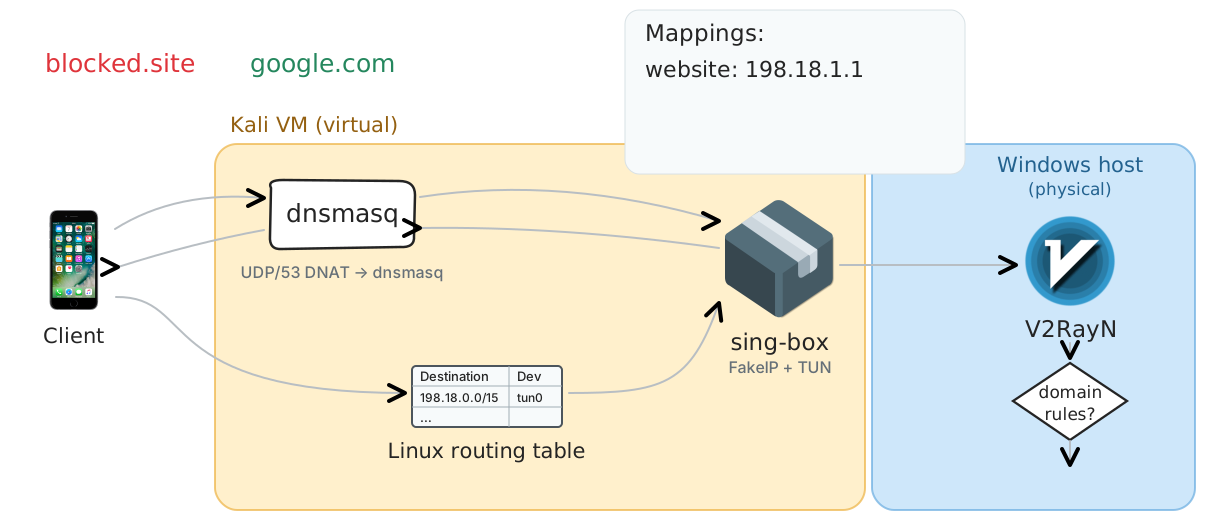
Sniffing recovers the domain name in non-standard proxy setups where the destination is an IP address; FakeIP eliminates the lengthy real DNS resolution.
sing-box TUN
sing-box TUN is the final piece that brings Linux and proxy routing together.
{"type": "tun","tag": "tun-in","interface_name": "sb-tun0",
"address": ["172.19.0.1/30"],"mtu": 1500,"stack": "gvisor",
"auto_route": true,"auto_redirect": true,"strict_route": true,
"route_exclude_address": ["192.168.108.0/24","192.168.109.0/24"]
}
The configuration routes all traffic to sb-tun0 interface where it’s processed. The route_exclude_address prevents routing loops where local traffic and traffic to the proxy server are routed back to the TUN. auto_route automatically modifies the Linux routing table to have traffic to sb-tun0 interface, and auto_redirect improves routing performance via nftables rules. With these settings, sing-box automatically handles routing and traffic flow once it's started.
0.0.0.0/1 via 172.19.0.2 dev sb-tun0 table 2022 # example sing-box rule
Occam's DNS
When presented with complex solutions, the simplest one is often the best.
So far, everything was FakeDNS for the sake of TProxying. I barely discussed how the Windows laptop gets internet access, especially DNS. DNS is an important topic for scientific internet access, the level of configuration is extensive and overwhelming. Bulianglin made 3 technical videos on DNS alone, which had helped me build this project.
DNS 泄漏与防护 — DNS leaks
DNS 分流与 FakeIP — DNS routing
DNS 代理与嗅探 — DNS proxying
The concerns are DNS leak and poisoning, which can reduce the proxy's effectiveness or break website access. However, every "DNS expert" seems to overlook the existence of Do Not Talk to Strange (DTTS), where an IP address is unblocked only if the client resolved the domain through the firewall itself. If any configuration hides DNS, the client can't access anything because it never resolved the domain through the firewall. Even without DTTS, a client that connects to websites while its DNS queries are unobservable is a telltale sign of proxy or VPN use.
After testing V2RayN's DNS settings, the exact behavior I wanted turned out to be the default:
- for direct traffic, it uses the system resolver, which is the cruise DNS
- for proxied traffic, the domain name is sent to the proxy, which is resolved in my home network
In a way, I'm intentionally leaking my DNS for "compliance", my setup would work well with authoritarian systems while preventing DNS poisoning. If the site needs to be proxied, the domain name sent over encrypted tunnel home and resolved there, where the IP address is correct; I can also proxy *.lan domains to access my local homelab resources.
I briefly considered vibe-coding a Go-based DNS response rewriter, based on my previous attempt which took advantage of firewall DNS poisoning and with a SNI proxy to proxy only the sites they specifically poisoned. The idea was to use the network's ordinary DNS resolver but detect suspicious responses such as NXDOMAIN, REFUSED, localhost, or known poisoned IPs. Those affected would be rewritten to the SNI proxy. Only those affected destinations would be redirected through a proxy. This automates the process of domain rule by routing only the sites that are blocked via DNS. However, I didn't implement it
Putting it Together
Now I had 3 separate terminal windows each running a program, and a lengthy Wi-Fi setup process.
sudo hostapd -dd /etc/hostapd/hostapd.conf
sudo dnsmasq --no-daemon --conf-file=/etc/dnsmasq.conf --conf-dir=/etc/dnsmasq.d
sudo sing-box run -c /etc/sing-box/config.json
I could create systemd services, but I took it further with dependencies. Using the target vbox-wifi-gateway.target, it requires hostapd, nftables, dnsmasq and sing-box. For hostapd, it requires my setup-wifi script for the Wi-Fi adapter. The sing-box is PartOf nftables, when nftables is restarted, sing-box must be restarted to recreate flushed rules during the restart.
vbox-wifi-gateway.target
├── Requires hostapd.service
│      └── Requires setup-wifi.service
├── Requires dnsmasq.service
├── Requires nftables.service
└── Requires sing-box.service
       ├── Requires/PartOf nftables.service
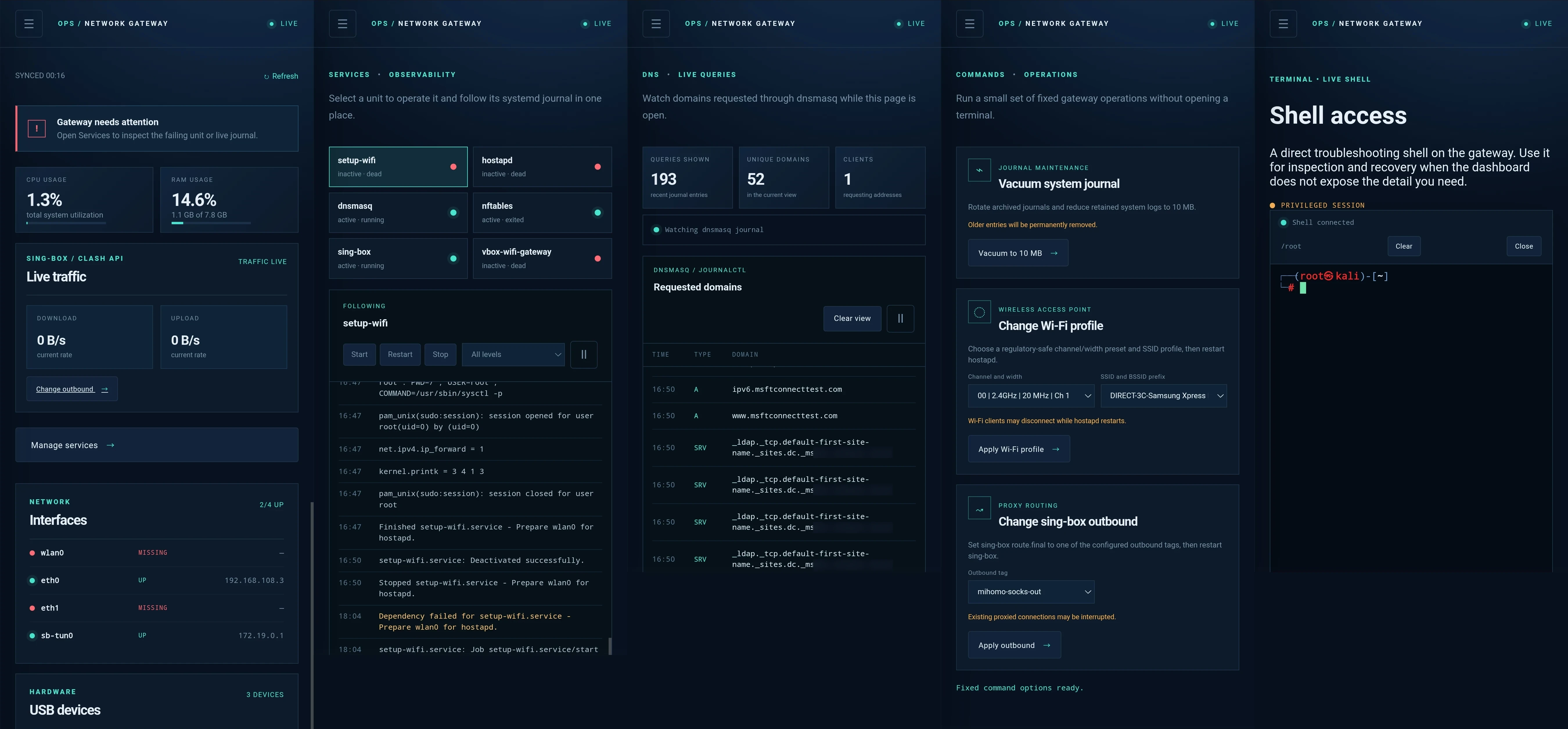
All I had to do was to start the target; every service comes online correctly. But apparently, having an entire Linux router in VirtualBox wasn't enough. I also vibe-coded a basic Python HTTP dashboard for mobile-friendly access. It has the most generic AI design and is probably insecure, but it works.
It featured system metrics, traffic rates, USB and network status, service controls, and live DNS logs. I could also manage Wi-Fi profiles, switch proxy outbounds, clean up logs, and even access a root shell through xterm.js. I added Wi-Fi channel and width controls, along with the ability to change the SSID with inconspicuous names like "Samsung Printer", "Canon Camera", and "GoPro".
RustDesk
I also used RustDesk with a direct IP, which was smooth and stable. If there are internet issues, I may need to check the computer, perhaps to reauthorize to the portal, and now I could do it remotely from my phone.
Since I'd chosen to manage domain routing through the v2rayN GUI, I still needed remote desktop access for certain changes. This was one advantage of the rejected dual-proxy architecture: if routing rules were managed entirely through sing-box configuration files, I can vibe-code the feature into my dashboard.
Despite building real-time speed monitoring, I kept using RustDesk to look at Task Manager for an overall picture of network usage; it had a graph and showed trends.
Overengineered
Behold, the Vbox Wifi Gateway works. My family’s Wi-Fi devices and mine can connect to my hotspot while my work laptop connects via Ethernet, and the cruise sees a Windows computer browsing the web. Websites work correctly, Teams calls connect and I can access my homelab 10,000km away.
But the moment we were dining, my dad needed internet access. I opened the mobile hotspot on my phone, and the hotspot just worked. That was the moment I realized, I overengineered the crap out of this project.
I spent weeks preparing and building. But there was no TTL detection, no OS fingerprinting, no website fingerprinting, no DPI, no DNS poisoning, no website blocking. I could access whatever I wanted and even share the internet with my family. In fact, when a hotspot client connects to my hotspot, their Princess app would show their Wi-Fi connection is MNet-Paid!
However, after finding out I can do my work at the gym, the inconvenience of 1 device plan surfaced, since I prioritized my work laptop, my family cannot access the internet.
AWS Client VPN
For work, I used AWS Client VPN to access our infrastructure.
The VPN connection is being terminated due to a discrepancy between the IP address of the connected server and the expected VPN server IP. Please contact your network administrator for assistance in resolving this issue.
I'd actually had to troubleshoot this exact issue at work the previous week, when our office was using Rogers 5G with CLAT. With my FakeIP enabled, the VPN server is resolved to 198.18.x.x, the connection works, but the address is not the same as the expected VPN server IP, so the connection is terminated.
It's definitely possible to run AWS Client VPN on a gateway VM with IP forwarding, and set up static routes at home to peer with our AWS VPCs and office. But the better solution is Remote Desktop Gateway, which I helped set up weeks ago. The RDG uses port 443 and it securely connects to the office network without VPN. I just remoted into my office laptop for work; this is also better for Codex agentic tasks, where the agent runs in the stable office network. Whereas the local Codex kept trying to download a 300MB update which was painfully slow.
Improvements
The network speed on the cruise was around 3Mbps down and 1Mbps up, somehow that was sufficient for Teams video calls and remote desktop. That led me to explore improvements which I didn't implement for this cruise, but something to think about next time.
Load Balancing
Of course for any project, there is always a rejected load balancer.
Princess offers faster Wi-Fi for a single device with their a la carte pricing, but you have to commit the entire trip and a minimum of 2 people, so that is ($70/people/day * 8 days * 2 people) * 1.4 or C$1568. Almost 2 grand for faster Wi-Fi.
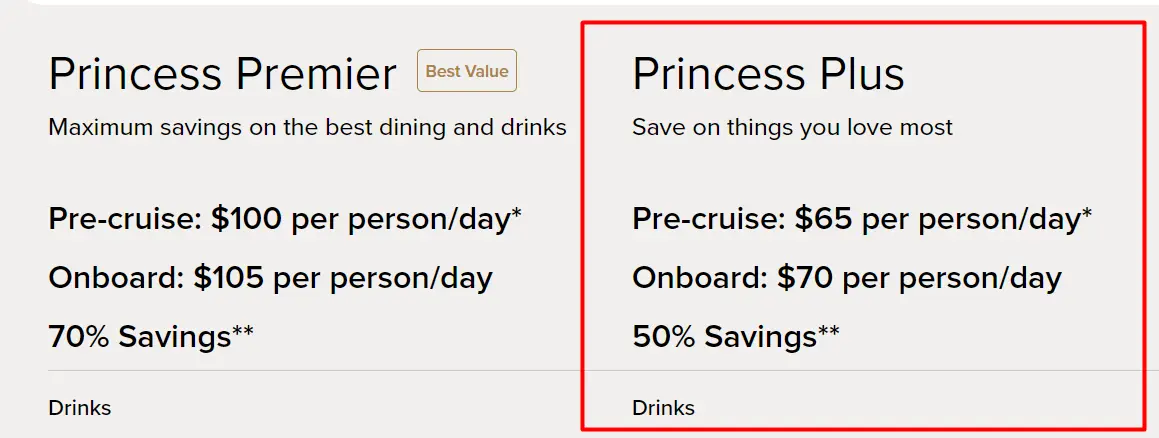
The four-device Wi-Fi plan is $45/day, a bargain compared to Princess Plus. My entire plan is reversed, instead of trying to share one connection to many devices, I'm combining multiple connections to serve one network.
I'm not building a Speedify clone overnight, but proxy tools also support load balancing that distributes different connections to different proxies. That's where my D-Link switch helps, by connecting laptops together in a private LAN.
- the MSI laptop as the gateway, with Kali VM and Wi-Fi, Ethernet passthrough
- my dad's laptop and my work PC connected to the switch, acting as workers
Each laptop could connect independently to the cruise Wi-Fi, while also participating in the private wired network. In theory, distributing traffic across three subscriptions could increase aggregate bandwidth from approximately 3 Mbps to 9 Mbps.
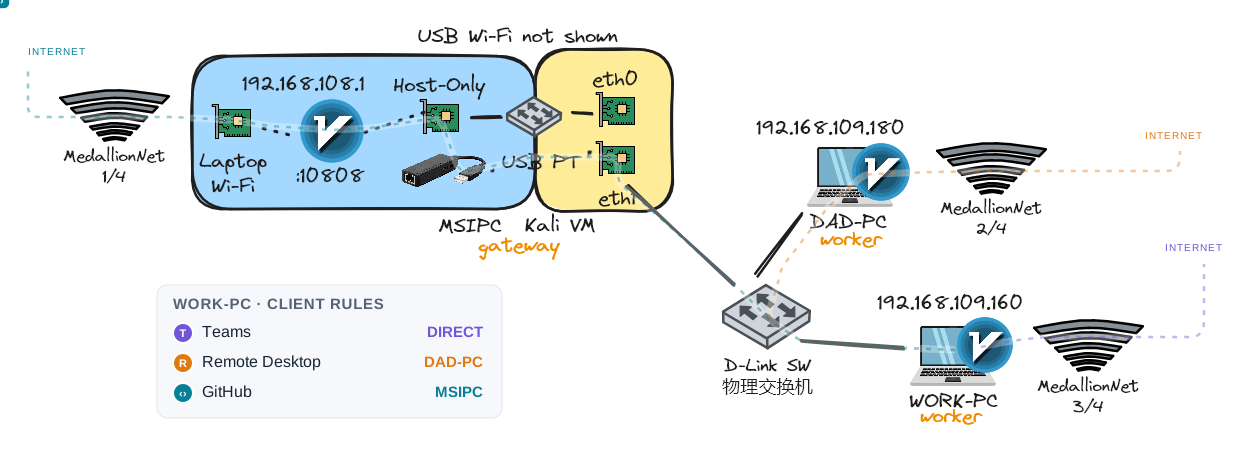
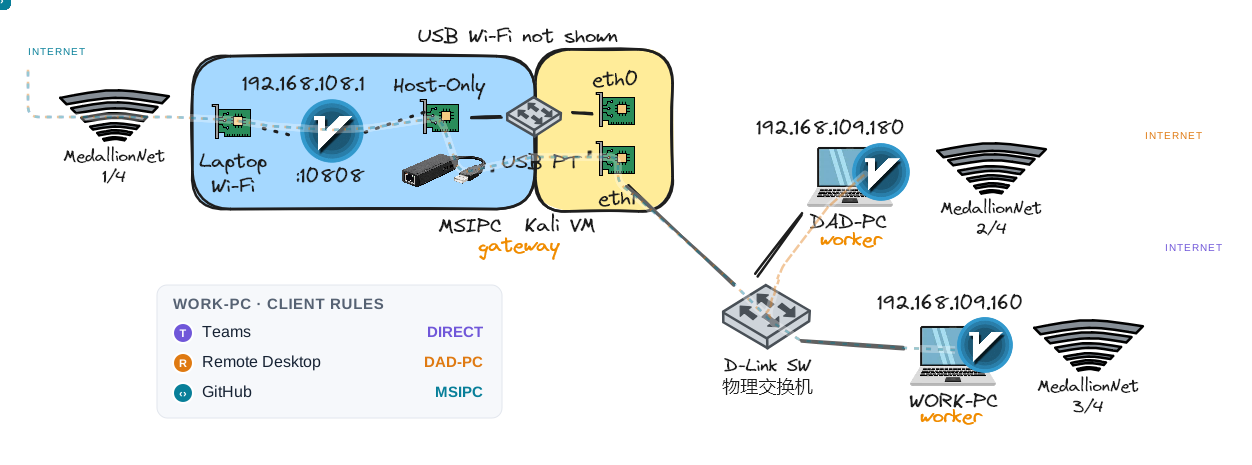
The issue is, when Windows connected to both cruise Wi-Fi and the private Ethernet network, it tended to prefer Ethernet for outbound traffic. That meant a proxy running on a worker laptop might send its upstream traffic back through the Kali gateway instead of using its own cruise Wi-Fi connection.
I could change the interface priority on Windows, but that's where I stopped. I also had to consider TUN mode clients, routing loops, and maintaining such a setup, excluding proxy server and LAN traffic, domain rule synchronization, proxy vs direct traffic, health checks, failover.
Browsing a website usually opens a single TCP connection and that can only be routed through a single outbound. So the only benefit I get is having Teams calls go directly, while remote desktop via another laptop to distribute the load.
Not to mention a complex distributed service with workers only to improve the speed from 3Mbps to 9Mbps, all I can get out of it is a fancy speed test demo.
QoS
When my sister or my mom streamed videos, the hotspot slowed to a crawl, the Windows Task Manager peaked at 3Mbps, as normal web browsing struggles for bandwidth. This is where QoS (Quality of Service) would be useful.
QoS prioritizes real-time traffic such as gaming and video calls over high bandwidth flows. At that point, my virtual gateway jank would’ve become a commercial router. This would've provided huge value to this project, by reducing the impact of heavy streaming on the rest of my hotspot, perhaps also prioritizing my own devices over others. With Linux, tc and CAKE can be used for traffic shaping and queue management.
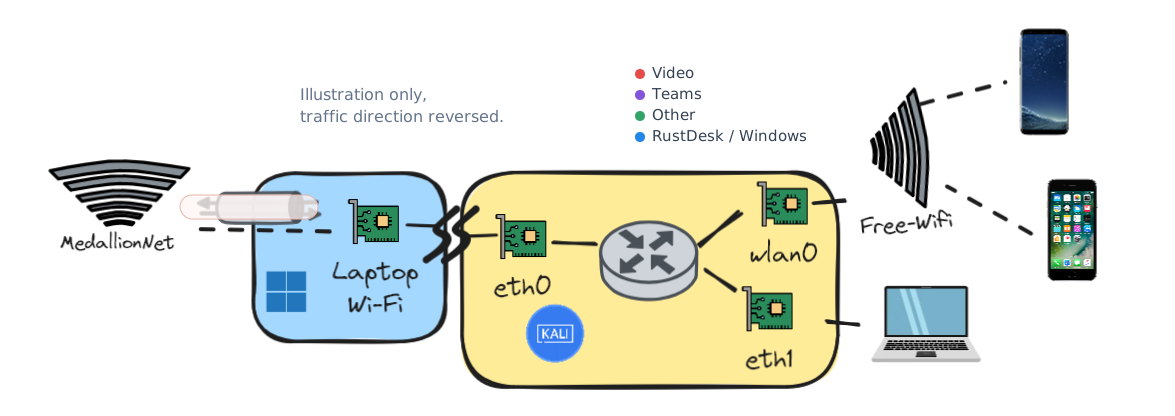
Technically the bottleneck is from Windows to internet and traffic management needs to be implemented there. If I implemented it in Linux, from wlan0 and eth1 out to eth0, I'd need to account for traffic to Windows local services such as RustDesk.
I discovered this problem during the cruise, when time and internet bandwidth were already limited. So QoS remained another idea for the next iteration.
Conclusion
TTL
Network visibility: TTL values of 64, 63 and 127 arriving from one IP
Consequence: Flag multiple devices
My approach: Proxy server ends the connection on Windows without NAT
TCP/IP Fingerprinting
Network visibility: Different OS fingerprints from one IP
Consequence: Flag multiple devices
My approach: Proxy server ends the connection to create a new one
DNS/SNI
Network visibility: Which websites are visited
Consequence: Blocking a website
My approach: Use proxy server to route specific domains to home network
Traffic Mix
Network visibility: Samsung phone pulling Windows updates
Consequence: Flag multiple devices
My approach: Proxy server routes non-Windows traffic to home network
DPI
Network visibility: VPN protocols are identifiable
Consequence: Block VPN servers
My approach: Use obfuscated VLESS over WebSocket on port 443 to blend in with normal HTTPS traffic
Single connection
Network visibility: VPN connection to a single server
Consequence: Block VPN servers
My approach: Use proxy server to selectively route blocked domains only
Checkpoints
Network visibility: Cruise line checking for travel routers
Consequence: Confiscate networking equipment
My approach: Use a normal laptop with a small USB Wi-Fi adapter
Captive Portal
Network visibility: Make it difficult for travel routers to connect
Consequence: Block unknown devices from connecting
My approach: Use Windows and Edge, which connect natively
I've effectively built a virtualized Wi-Fi gateway that addresses problems on multiple layers to ensure a resilient internet access solution. It combines host-only networking, USB passthrough, transparent proxying, FakeIP and domain-based routing over an encrypted VLESS tunnel. The project provided a functional Wi-Fi hotspot for myself and my family, saving the money needed to purchase an expensive Wi-Fi plan, while enabling seamless network access to my homelab, remote work and scientific internet access for everyone else. The knowledge and application of hardware, networking concepts, virtualization and proxy application configuration were valuable, even if I spent weeks solving a problem that didn't exist.